How to Set Up Recurring Payments for Your Fitness Business

You finish a session, open your phone, and see the part of the job you hate most. A client who trained this week still hasn't paid. You send the polite reminder, then the softer follow-up, then the message that starts sounding like collections even though you're just trying to get paid for work you already did.
That cycle drains energy fast. It also changes the feel of the relationship. Instead of being the coach who leads training, nutrition, and accountability, you become the person chasing invoices between sessions.
Recurring payments fix that when they're set up properly. Not as a random autopay toggle, but as a clear system with consent, billing rules, reminders, and a plan for failed cards. If you coach clients from home, online, or in a hybrid model, that kind of structure matters just as much as your programming does, especially if you're building a roster that needs to run professionally from day one. A lot of the same operational discipline shows up in other parts of the business too, including building a sustainable personal training business from home.
Table of Contents
Stop Chasing Late Invoices and Start Coaching
The awkward part of manual billing isn't just the admin. It's the timing. The client is still booking sessions, still messaging you about macros, still asking about next week's plan, and you're trying to decide when to ask, again, about the unpaid invoice.

That's usually the moment coaches start searching how to set up recurring payments. Not because they suddenly care about billing software, but because they're tired of mixing money stress into client communication.
Recurring billing has been around for years. It became practical as card networks, merchant accounts, and automated billing software matured. The setup basics are still the same across major markets. Choose a processor or billing platform, define billing frequency and payment terms, collect explicit customer consent, and automate retries and reminders for failed payments, as outlined in the U.S. Chamber recurring payments guide.
Practical rule: If you're still relying on memory, manual invoices, or “I'll send it after the session,” you don't have a payment system. You have a payment habit, and habits break when you get busy.
What works is simple. The client agrees to the amount, the schedule, and the cancellation terms up front. Their payment method is stored securely through the processor. Charges run on a set cadence, and the software handles the repeat admin.
What doesn't work is piecing this together with notes app reminders and awkward text messages. That setup always seems manageable with a small roster, right up until late payments pile up and your coaching week starts with collections.
Choosing and Connecting Your Payment Processor
Pick the processor first. Everything else sits on top of that decision.
For most solo trainers, the realistic short list is Stripe or Square. Both are established options. Both can handle recurring charges. The difference is less about hype and more about how you work day to day.
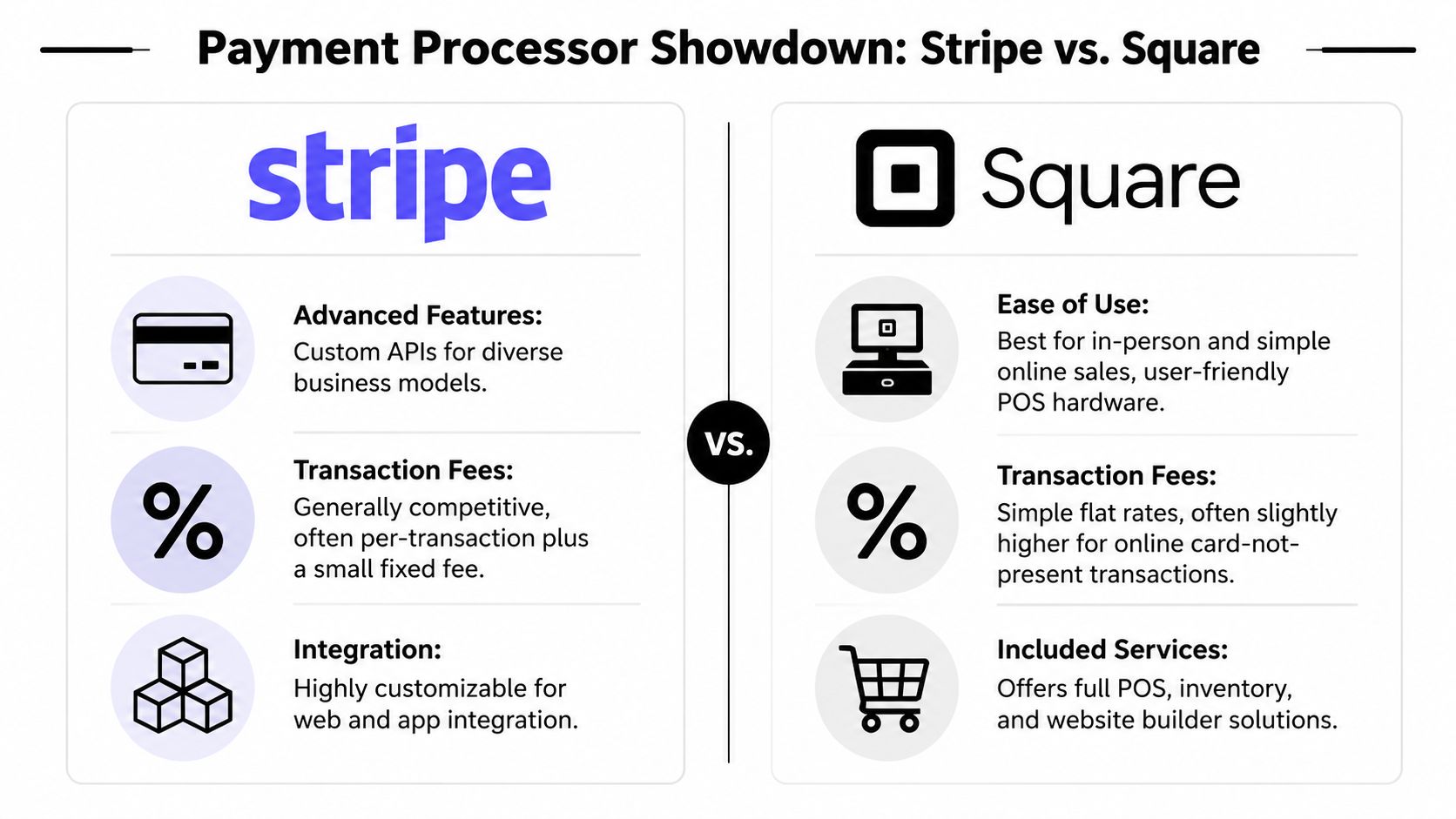
Stripe or Square
If most of your business is online coaching, Stripe usually feels cleaner. It's built for web and app integrations, and it tends to fit coaches who want payments connected to forms, checkouts, and a client platform.
If you do a lot of in-person sessions, Square often feels more natural. It's well known for point-of-sale simplicity and can handle face-to-face payments without extra friction.
A practical comparison looks like this:
Factor | Stripe | Square |
|---|---|---|
Best fit | Online and hybrid coaching | In-person and simple online sales |
Setup style | More flexible | More straightforward |
Customization | Strong integration options | Simpler out of the box |
Day-to-day feel | Better when software is connected | Better when payments are more standalone |
If you're evaluating broader software around that decision, this guide to the best personal trainer apps helps frame what matters beyond billing.
Direct processor or connected platform
You can use a processor directly, or connect it through your coaching software. Both can work. The trade-off is visibility.
Using the processor directly is fine if your offers are simple and you don't mind checking one dashboard for payments and another for coaching. But split systems create blind spots. A payment can fail while the client still looks active in your calendar, messages, and program delivery.
A stronger setup treats recurring payments as a controlled flow. The sequence is straightforward. You collect explicit authorization for the amount, schedule, and expiry date, store the payment method securely through the processor or vault, then run charges on the scheduled date. The processor sends an approval or decline response, and both sides should be notified right away, as described in this overview of setting up recurring payments and payment logic.
Use a billing engine and a payment rail together. The processor moves the money. The billing logic decides when, why, and what happens if something goes wrong.
What to decide this week
Before you connect anything, answer these questions:
Where do you coach most often
Mostly online, mostly in person, or a real hybrid mix.How many payment scenarios you sell
Monthly coaching, fixed-length programs, session packs, nutrition add-ons, or pause-and-resume offers.Whether you need client-facing self-service
Clients updating cards and managing plans themselves saves a lot of admin later.
The right processor won't magically fix poor billing rules. But it gives you a stable base to build on.
How to Structure Your Coaching Packages for Automation
Most payment problems start before the first charge. They start when the package isn't built clearly enough to automate.

If the offer is vague, billing gets messy. If the terms are clear, automation is easy. That means every package needs a billing frequency, a start date, a renewal rule, and a pause or cancellation policy before you send the payment link.
Match billing to delivery
A recurring charge should match how the client experiences the service.
Ongoing online coaching works best as a monthly retainer. The client is paying for access, programming, check-ins, and accountability on an ongoing basis. Billing monthly keeps the service and the payment rhythm aligned.
A fixed coaching block should still be broken into a schedule the software can handle cleanly. If you sell a 12-week program, don't treat it like a vague promise with random invoices. Set a defined installment plan with a clear start and end.
Session packs need rules even if they aren't classic subscriptions. You can set them to renew after use, but only if your terms are explicit about when renewal happens, what pauses look like, and how unused sessions are handled.
Set dates before you send anything
One of the most useful billing habits is creating bills ahead of the service date. Some systems default to 30 days in advance and allow adjustments from 1 to 365 days, which separates the billing date from the service date and gives you time to prepare and reduce missed charges, according to BILL's guide on setting up recurring payments.
That one detail helps more than most coaches expect. You stop tying “today's session” to “today's payment chase.”
Use this setup logic:
Choose the charge date
Pick a consistent day that fits your delivery cycle, not just whatever day the client first messaged you.Choose the service start date
This can be the same as the charge date, but it doesn't have to be.Choose the renewal window
If the package renews, define when that happens and whether it's ongoing or ends on a set date.Set an end rule where needed
If it's a fixed program, make the end clear. If it's ongoing coaching, define the cancellation notice.
Coaches get into trouble when they sell one thing, deliver another, and bill on a third schedule.
Use clear package logic
Here's a clean way to translate common offers into automated billing.
Monthly retainer
Use this for ongoing coaching with regular programming, check-ins, and support.
Billing model
Recurring monthly chargeClient agreement
Amount, billing date, cancellation terms, and what the service includesBest use case
Online coaching and hybrid coaching where support continues regardless of session count
This model is usually the easiest to automate because the service is continuous.
Fixed-length program
Use this when the result is tied to a defined block, like a transformation phase, return-to-training phase, or skills block.
Billing model
Installments on a defined scheduleClient agreement
Total program length, installment schedule, what happens if a client pausesBest use case
Programs with a clear beginning and endpoint
The mistake here is billing it like open-ended monthly coaching. If the program has a finish line, the billing should too.
A quick walkthrough helps if you want to see how coaches explain this in practice:
Session-based coaching
Use this only if your scheduling is tight enough to support it.
Billing model
Prepaid pack with optional auto-renewalClient agreement
Number of sessions, expiry or pause terms, renewal triggerBest use case
In-person clients who buy training in blocks
Coaches often create chaos for themselves. If the renewal trigger is “when I notice they're almost out,” it's not automated. It's manual with extra steps.
Onboarding Your Clients to the New Payment System
The tech side is easy compared to the conversation. Clients usually don't resist recurring payments when the message is clear. They resist confusion.
What clients need to hear
Keep the explanation short. Most clients only need four points:
What they're being charged for
Name the package in plain English.When the charge happens
Give the exact billing cadence and start date.How they can update their card
Don't make them message you for basic account admin.How pauses or cancellations work
This reduces disputes before they happen.
For new clients, recurring billing feels normal if it's part of the onboarding from day one. For current clients, frame it as a professional upgrade. It removes manual invoices, keeps their coaching uninterrupted, and makes scheduling cleaner on both sides.
If you're tightening up your intake process at the same time, this guide to client onboarding software for coaches is a useful companion.
The best payment message doesn't sound like a demand. It sounds like a clear operating system.
Client communication templates for automated payments
Scenario | Message Template |
|---|---|
New client starting coaching | Hi [Client Name], to keep your coaching simple and uninterrupted, I set all plans up on recurring payment. Your package is [Package Name], your card will be charged on [Date/Frequency], and you'll receive confirmation each time a payment goes through. You'll also be able to update your payment method if needed. Before we start, please review and approve the payment schedule and service terms. |
Existing client moving from manual invoices | Hi [Client Name], I'm updating my billing system so payments are more consistent and you don't have to deal with manual invoices each cycle. Starting on [Date], your coaching will move to automatic recurring payment for [Package Name]. Nothing about your coaching changes. This just keeps billing cleaner and avoids missed invoices. I'll send the authorization link today so you can approve the schedule and save your payment method. |
Client asking why autopay is required | I use recurring billing so your training plan, check-ins, and scheduling run without interruptions or manual payment reminders. It keeps the business side clear and makes sure your coaching stays active on the same schedule every cycle. |
Client who may need a pause | If you need to pause, message me before your next billing date so I can apply the pause according to your plan terms. That way we can protect your spot and avoid charging you for a period you're not using. |
Small changes that reduce friction
Don't bury payment terms inside a long welcome message. Put them where clients can find them.
Use this checklist:
Send authorization before the first coaching deliverable
Don't program first and sort money out later.Use one payment date per client
Random charge dates create admin clutter.Write pause terms in plain language
“Pause requires notice before the next billing date” is better than legal-sounding filler.Confirm after setup
A short confirmation message reassures the client that everything is handled.
Most billing friction comes from ambiguity, not resistance.
Managing Your Payments and Cash Flow
Once recurring billing is live, your job shifts from collecting money to monitoring the system. That's a better job. It's also where a lot of trainers get lazy.
What to monitor every week
Check the dashboard on a set day each week. Don't wait until your bank balance feels off.
Look for:
Successful payments
Make sure recent charges cleared.Upcoming renewals
Know what's scheduled next.Failed payments
Catch declines before they drag into a client issue.Clients near expiry or pause points
These often create silent churn if nobody follows up.
A standalone processor shows transactions. That's useful, but limited. It tells you money moved, or didn't. It usually doesn't show the coaching context around that payment.
Why disconnected tools create leaks
For fitness coaches, the bigger issue isn't basic automation. It's revenue leakage from failed payments and churn, which requires recovery and retention logic, not just “set the billing interval,” as discussed in ChargeOver's article on recurring payment setup for service businesses.
That's the gap most guides ignore. A client pauses for travel, a card fails, a package ends mid-month, or a session pack runs out. If your payment tool doesn't connect to client status, you end up with active coaching attached to inactive billing.
That's one reason many coaches move away from cobbled-together systems with buggy apps, rising prices, and support teams that stopped listening after an acquisition. When payments sit next to scheduling, messaging, and client records, it's easier to see what is happening in the business. If you also coach around habits and food logging, the same issue shows up in adjacent workflows, which is why tools built for coaches matter more than generic software. This breakdown of a nutrition coach app highlights that same pattern.
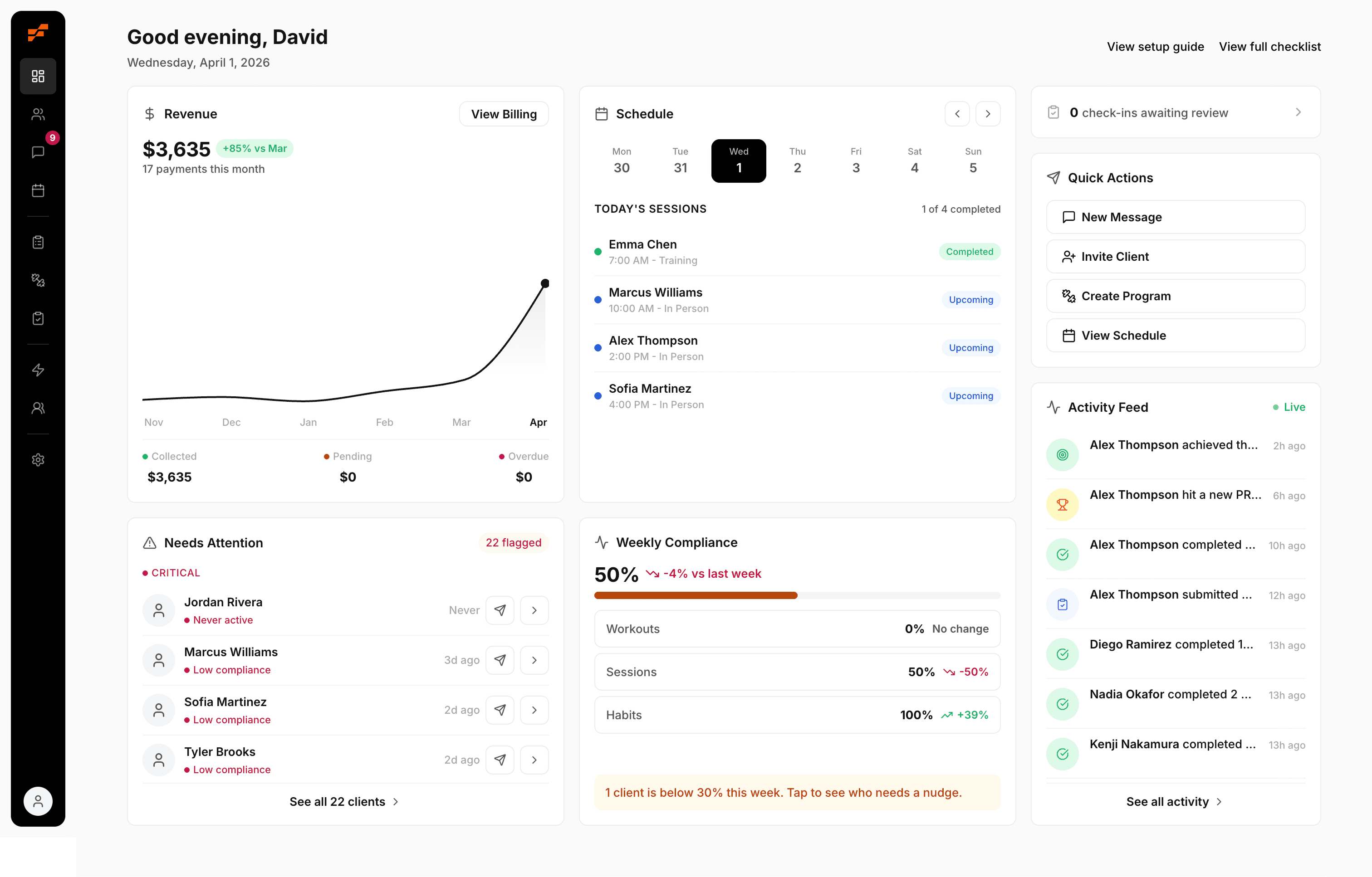
David Spitdowski, FitCentral's Co-Founder and a practicing personal trainer, built around that real workflow problem. The useful shift isn't just that charges recur. It's that billing can connect to whether the client is active, paused, booked, progressing, or slipping.
Handling Failed Payments, Refunds, and Legal Records
No matter how clean your setup is, cards expire, banks decline charges, and clients change plans. The fix is to make the exception path just as organized as the normal one.
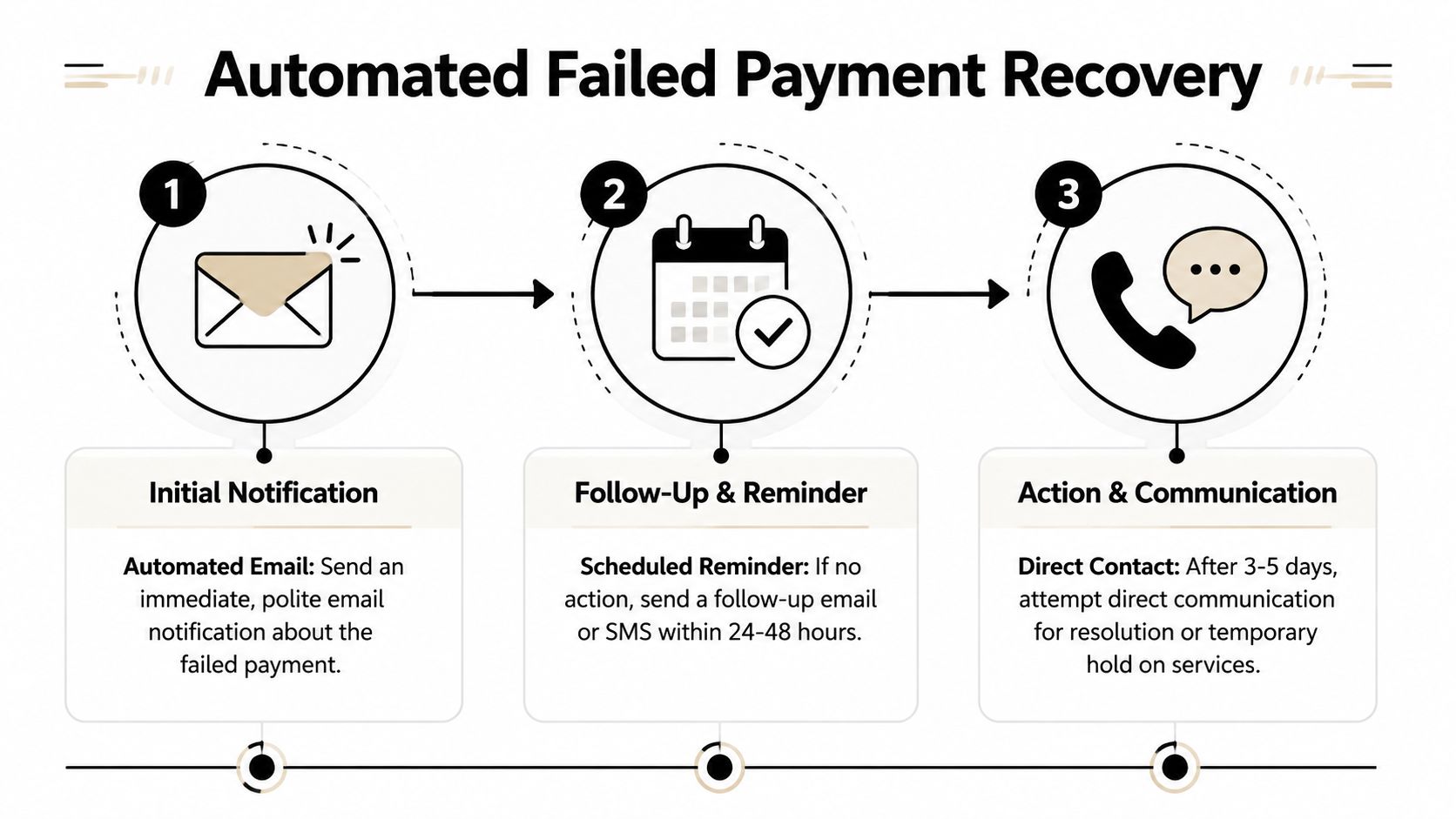
A simple failed payment process
Payabl recommends a reminder sequence of 30 days before card expiry, 14 days before expiry, and 3 to 5 days before the next charge date, plus an immediate message after the first decline in its guide to recurring payment failures and dunning timing. That gives you a clean structure without turning every failed charge into a personal confrontation.
Use a simple three-step process:
Immediate decline notice
Send an automated message as soon as a payment fails. Keep the tone neutral and include a payment update link.Scheduled follow-up
If the client doesn't update their card, trigger the next reminder automatically.Direct contact and service hold
If there's still no action, reach out directly and pause service according to your written terms.
A failed payment should trigger a workflow, not a debate.
Refunds and records
Refunds need a policy before you need a refund. Keep it tied to the service type.
For example:
Ongoing coaching
Refunds are usually cleaner before a new billing cycle starts than after programming and support have already been delivered.Fixed programs
Tie the refund policy to the stage of delivery, not emotion in the moment.Session packs
Decide in advance how unused sessions are handled.
For records, save the reports your processor gives you for completed payments, failed payments, refunds, and payout history. Keep client authorizations and your package terms in the same place. If you ever need to explain a charge, a cancellation, or a refund, you want the paper trail ready.
If your business is growing and you're formalizing more of your operation, it helps to tighten the admin side alongside the coaching side. This overview of personal trainer requirements is a good reminder that professionalism isn't only about programming.
FitCentral gives coaches a practical way to run this whole workflow in one place. You can connect recurring payments through Stripe or Square, tie billing to real client status, and stop switching between scattered tools to figure out who paid, who's active, and who needs a follow-up. If you want a cleaner system for coaching, scheduling, client communication, and payments, take a look at FitCentral.
See also




Ready to stop fighting your software?
FitCentral gives you everything you need to manage clients, deliver results, and grow your business. Sign up today.