Nutrition Coach App: A Trainer's Guide to Switching
You finish a client session, open your laptop, and lose the next hour to cleanup work. One client sent meals by text. Another logged half their day in an app that freezes on image upload. A third updated body weight in a spreadsheet you forgot to check. By the time you’ve pieced together what happened, your coaching brain is wasted on admin.
That’s usually when coaches start searching for a better nutrition coach app. Not because they want more bells and whistles, but because they’re tired of software adding friction to work that already demands attention, judgment, and consistency. If you’ve been burned before by rising prices, ignored feedback, or an app that looked polished until your clients had to use it, the next switch has to be different.
Table of Contents
Why Your 'Good Enough' App Is Costing You Clients
The hidden cost is attention
Good enough software creates fake coaching problems
What this means for your business
Defining Your Non-Negotiables Before You Shop
Start with client experience
Audit your own workflow
Protect the business side
Core Features Versus Critical Red Flags
Core features that earn their place
Red flags that usually get worse over time
The Migration Plan How to Switch Safely
Use the overlap method
Decide what data actually needs to move
Tell clients what changes and what stays the same
Run a short onboarding sprint
Questions to Ask About Pricing Support and Growth
Pricing questions
Support questions
Growth questions
Your First 24 Hours on a New Platform
Run a same-day stress test
What good should feel like immediately
Why Your 'Good Enough' App Is Costing You Clients
The main issue with a mediocre nutrition coach app isn’t that it annoys you. It’s that it damages the client experience.

A coach can work around almost anything for a week or two. You can check three places for meal logs. You can copy macros into notes. You can chase payments in one tab and progress photos in another. The issue is what happens after months of that routine. Response times slow down. Check-ins get shorter. Small coaching observations get missed.
That’s where retention starts to slip.
A 2026 industry analysis found that 68% of online coaches cite integration failures and buggy apps as top barriers to client retention, especially when nutrition, workouts, and payments live in separate tools, according to the Healthion app market reference. That number makes sense to anyone who’s had clients stop logging, not because they stopped caring, but because the process became annoying.
The hidden cost is attention
Clients don’t judge your system the way coaches do. They don’t care about your backend logic or whether you’ve built a clever workaround. They care whether logging lunch takes ten seconds or ten minutes, whether they can see what you want them to do next, and whether your feedback feels connected to what they entered.
When the app makes simple tasks feel heavy, clients start doing less of them.
Practical rule: If a client has to think too hard about where to log, upload, message, or check progress, your system is already leaking compliance.
Good enough software creates fake coaching problems
A lot of what looks like low motivation is really bad process.
You see it in familiar patterns:
The inconsistent logger who logs fine, but only when the app responds quickly
The ghosted check-in that turns out to be a missed notification or clunky upload flow
The nutrition client who seems disengaged but is really stuck between text messages, a PDF meal guide, and a separate tracker
The coach who feels behind because every adjustment requires copying data from one tool into another
That’s not a discipline problem. That’s a workflow problem.
What this means for your business
If you manage your own roster, software isn’t a side issue. It shapes how much usable attention each client gets. Every extra click has a cost. Every unresolved bug forces you to spend trust with your clients.
And once a client starts feeling friction, they rarely say, “Your platform architecture is the issue.” They just drift. They log less. They reply later. They become harder to coach.
The app doesn’t need to impress you in a demo. It needs to disappear during a normal Tuesday.
That’s why switching tools shouldn’t be treated like a nuisance project. It’s a retention project. It’s a service-quality project. It’s a time-recovery project.
Defining Your Non-Negotiables Before You Shop
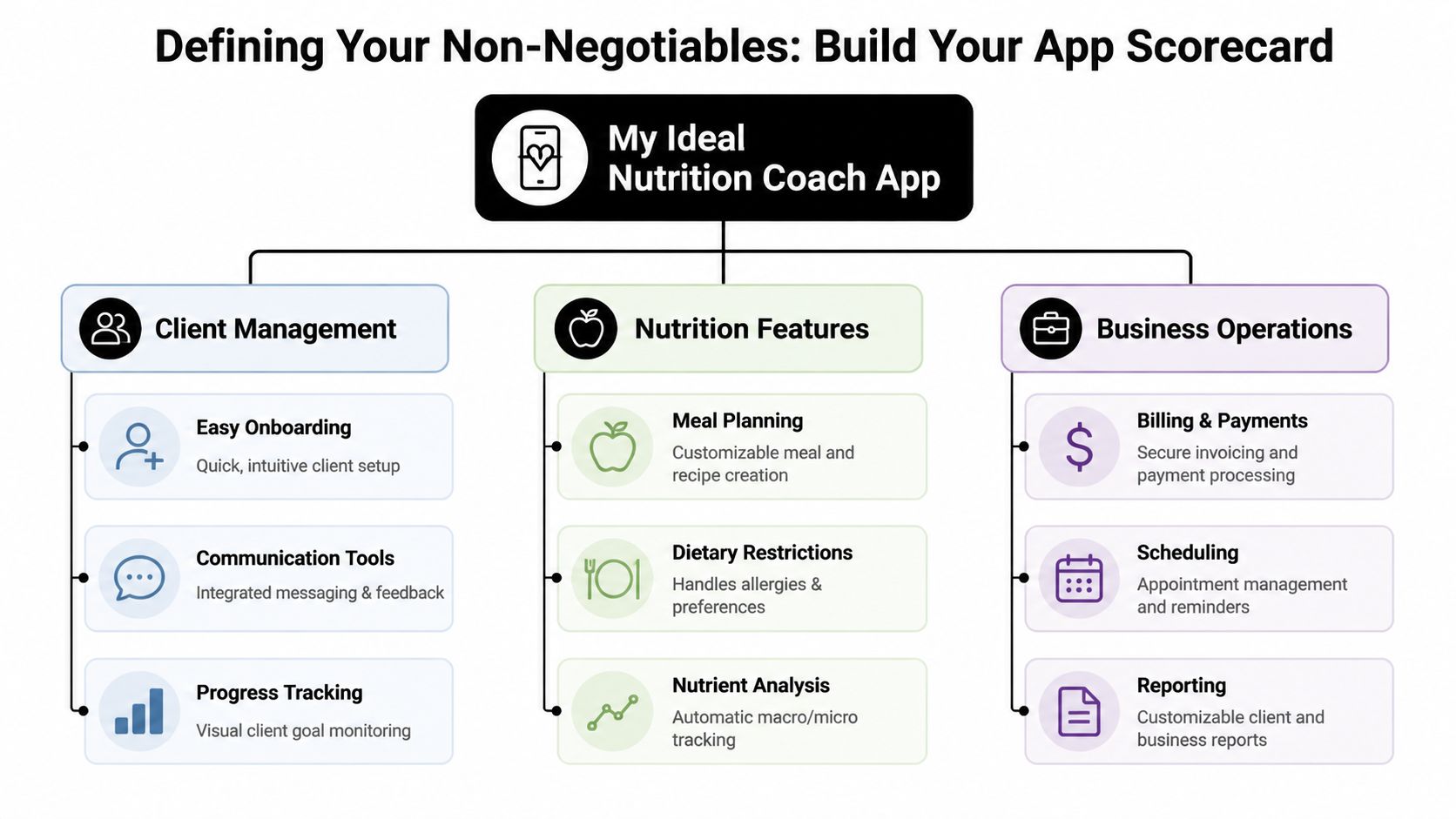
Before you compare any nutrition coach app, build your own scorecard. Most coaches skip this and end up choosing based on a flashy demo, a feature list, or a temporary promo. Then six weeks later they realize the app still doesn’t fit how they coach.
Use three filters. Client experience. Coach workflow. Business health.
Start with client experience
The best nutrition plan in the world is useless if clients won’t interact with it consistently.
Research on app-based nutrition interventions shows that apps using self-monitoring through daily logging and clear coach feedback produce a median weight loss of 1.2% to 2.3% over 6 months, with client satisfaction between 74% and 79%, according to this review of behavior change techniques in nutrition apps. That matters because it tells you what to prioritize. Not novelty. Not gimmicks. The basics done cleanly.
Ask:
Can clients log food fast? If logging feels like homework, usage drops.
Can they see targets clearly? Macros, habits, and daily actions should be obvious.
Can they review progress without asking you? Clients should be able to spot streaks, misses, and momentum on their own.
Does feedback land in the same place they already use? Split communication usually means missed context.
Audit your own workflow
A nutrition coach app should reduce review time, not create another inbox.
Write down your current weekly process and be honest about where time disappears:
Check-ins
How many places do you open to review one client?Adjustments
Can you change nutrition targets, habits, or next steps from one screen, or are you bouncing between tabs?Context
When a client misses targets, can you quickly see training, habits, notes, and messages together?Follow-up
Do reminders happen automatically, or are you manually nudging people every week?
A good system shortens the distance between seeing a problem and acting on it.
If you want examples of how coaches think through that kind of workflow cleanup, the articles on the FitCentral coaching blog are useful for pressure-testing your own process.
Protect the business side
Coaches often fall into this trap. The product seems solid. The client app looks decent. Then pricing changes, support goes soft, or key issues sit unresolved.
Use a simple scorecard like this:
Area | Non-negotiable question | Pass or fail sign |
|---|---|---|
Client | Can a new client understand the app without a walkthrough? | If not, expect support drag |
Coach | Can I complete a full nutrition review quickly? | If not, admin grows with roster size |
Business | Is pricing clear and stable? | If not, long-term cost becomes a risk |
Support | Can I reach a real person when something breaks? | If not, client trust falls on you |
A lot of feature comparison pages miss this. Coaches don’t need the longest list. They need a short list of things that must work every single week.
Core Features Versus Critical Red Flags
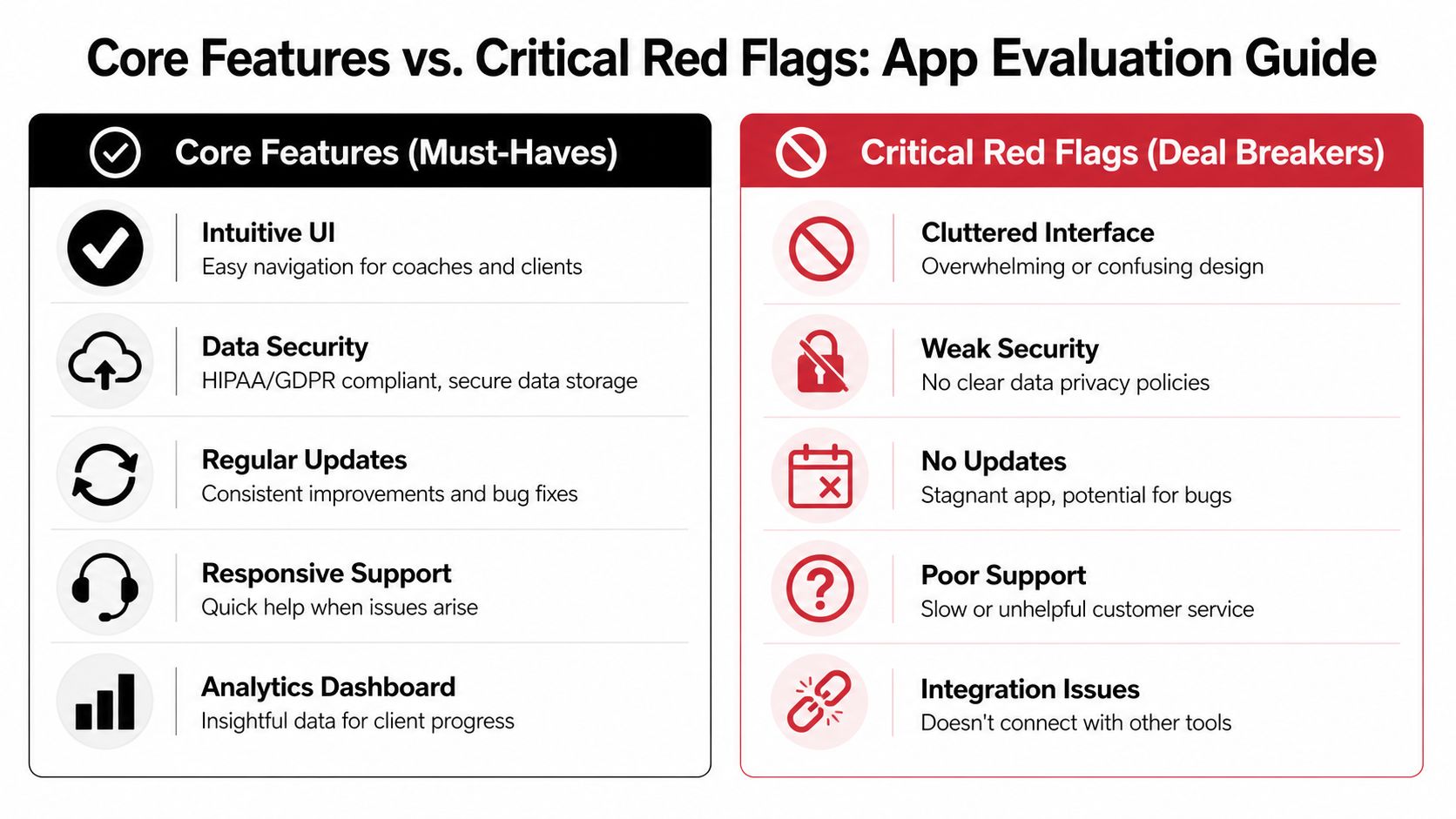
Once your scorecard is clear, evaluating a nutrition coach app gets much easier. You stop asking, “What can this platform do?” and start asking, “What will this platform force me to tolerate?”
Core features that earn their place
The best platforms don’t just track intake. They support coaching decisions.
Across top diet and nutrition apps, 45% of users report successful weight loss, 70% improve their eating habits within three months, and 30-day retention reaches 45%, according to these diet and nutrition app statistics. Those outcomes don’t come from pretty dashboards alone. They come from features that make consistency easier.
Here’s what usually matters most in the field:
Verified food logging tools
Barcode scanning, a reliable food database, and quick search matter because inaccurate or slow logging kills adherence.Flexible macro and micronutrient tracking
Clients don’t all need the same level of detail, but coaches need the option to zoom in when needed.Custom meals and recipes
If you can’t save repeat meals, standard breakfasts, restaurant stand-ins, or client-specific recipes, you’ll end up repeating work.Habit tracking that sits next to nutrition Water, meal timing, protein anchors, steps, sleep routines. These are often where compliance improves.
Progress photos and body metrics in the same client record
Nutrition decisions get sharper when visual and performance context live together.
Red flags that usually get worse over time
Bad software rarely stays at the same level of bad. If a company is slow to fix obvious problems now, the pain tends to compound after you commit.
Watch for these dealbreakers:
Opaque pricing
If you can’t tell what triggers a higher bill, assume surprises are coming.A stale product history
No visible updates usually means bugs linger and feedback disappears.Support that sounds scripted
When support replies dodge the actual issue, you become first-line support for your clients.A client app with poor real-world usability
The coach dashboard can look polished while the client side feels clumsy.Weak integration logic
If nutrition data can’t sit cleanly alongside training and check-ins, you’re back to patching workflows yourself.
A quick reality check is to review the platform’s recent product changelog from FitCentral or any equivalent public update history from the company you’re considering. You’re not just looking for activity. You’re looking for evidence that bugs get fixed and the product still has a pulse.
If the demo highlights branding before it shows daily workflow, be careful. Coaches live in workflow.
The Migration Plan How to Switch Safely
The reason many coaches stay with a bad system is simple. They’re not afraid of learning new software. They’re afraid of disrupting paying clients.
That fear is valid. A sloppy migration creates confusion fast. But a clean one is manageable if you control the order and keep the change small at first.

Use the overlap method
Don’t shut one system off on Friday and move everyone Monday.
Run both systems in parallel for a short window with a small test group. The exact timeline depends on your roster and service style, but the principle stays the same. Keep risk contained.
A practical rollout looks like this:
Pick a test group Choose a handful of reliable clients. Use people who give useful feedback and consistently complete check-ins.
Move one service flow first
Start with nutrition logging and check-ins, not every business process at once.Keep your old system active temporarily
This gives you a fallback if something gets missed.Track friction points immediately
Note where clients hesitate, where data is messy, and where your own review process slows down.
Don’t test with your hardest clients first. Test with your clearest communicators first.
Decide what data actually needs to move
Coaches waste time trying to migrate everything. Most of it doesn’t matter.
What usually deserves transfer:
Current nutrition targets
Recent body metrics
Progress photos you still use
Active habits
Key notes on preferences, restrictions, and adherence patterns
Current payment and scheduling status if relevant to your setup
What usually doesn’t need full historical recreation:
Old message threads you never revisit
Expired meal plans
Ancient weigh-ins
Unused templates
Redundant spreadsheets
You’re not building an archive. You’re building a clean working environment.
Tell clients what changes and what stays the same
Clients don’t need a long technical explanation. They need confidence.
Use simple language:
What’s changing
Where they log food, check progress, and receive feedbackWhat’s staying the same
Their goals, your coaching standards, and your check-in rhythmWhy you’re changing it
Faster logging, cleaner communication, less back-and-forth, better visibilityWhat they need to do today
Download, log in, complete onboarding, and send one test entry
A short message plus a one-minute walkthrough often works better than a detailed document nobody reads.
Run a short onboarding sprint
Batch the move. Don’t drag it out over a month of half-finished transitions.
Set aside a dedicated sprint where you:
Import or recreate your core templates
Add active clients in groups
Review each client profile for missing essentials
Run one full test check-in from the client side
Confirm reminders, notifications, and payment links work
Platform design matters. David Spitdowski, FitCentral’s co-founder, still coaches clients himself, which is one reason the product speaks directly to the realities of trainer workflow instead of treating migration like a minor setup task. If you want to ask specific questions before moving your roster, the FitCentral contact page is the right place to do it.
The main point is simple. Safe switching isn’t about moving everything at once. It’s about reducing uncertainty at each step until the new process feels normal.
Questions to Ask About Pricing Support and Growth
A nutrition coach app can look great in a trial and still become a headache six months later. That’s why the pre-purchase conversation matters as much as the product demo.
The market is getting crowded fast. The virtual nutrition coach app market is projected to grow at a CAGR of 16.17% from 2024 to 2033 and reach USD 1,111.4 billion by 2033, according to this virtual nutrition coach app market projection. Growth attracts new vendors. It also attracts companies chasing fast expansion, not long-term coach trust.
Pricing questions
Don’t ask only what it costs today. Ask how the bill changes when your business changes.
Use questions like these:
What triggers a price increase?
More clients, more features, more staff, payment processing changes, or support level?What is included in the base plan and what is not?
You want the full picture, not the teaser rate.What happens if I grow my roster steadily?
Get a realistic explanation of how pricing scales.Are key functions locked behind future tiers?
This matters if the platform uses feature gating to push upgrades.
If you want to benchmark transparent pricing against what many coaches say they wish they had from the start, review the FitCentral pricing page.
Support questions
Support quality shows up when something breaks in front of a client.
Ask directly:
Who answers support tickets?
Product-trained people or a generic queue?How are urgent issues escalated?
You need to know what happens when a client can’t log, pay, or access a plan.How does bug reporting work?
Vague promises are a warning sign.Can you show recent examples of product fixes?
You’re checking for responsiveness, not polished language.
Good support doesn’t just close tickets. It removes repeat friction from the product.
Growth questions
You learn whether the company views coaches as users or as partners.
Ask:
How do you collect and prioritize product feedback?
What kinds of coach requests have shaped the roadmap recently?
How often does the product update?
How do you protect service quality as you grow?
Those answers tell you a lot. A stable partner usually speaks clearly about trade-offs, listens well, and doesn’t hide behind sales language.
Your First 24 Hours on a New Platform
A free trial shouldn’t be a casual click-around. Treat it like a live stress test.
If a nutrition coach app is going to save you time, you should feel that quickly. Not after weeks of setup. Not after a sales call. Within the first day.
Run a same-day stress test
Use this checklist before you commit:
Brand the account
Add your logo, business name, and coach profile details. You’ll see fast whether the client-facing experience looks professional or patched together.Create a small test roster
Add 3 to 5 test clients, as your own internal sample, and walk through onboarding from both coach and client view. Use different client types, like fat loss, performance, and habit rebuild.Build one complete nutrition workflow
Set targets, create a sample meal or nutrition template, add habits, and test how long it takes.Run one full check-in
Log food, upload progress, send feedback, and review the end-to-end process without skipping steps.Test mobile reality
Do the client tasks from your phone, not just your desktop. That’s where friction usually shows up.
For coaches thinking about presentation as part of retention and referrals, the guide to fitness trainer business cards is a useful reminder that every client touchpoint shapes perceived professionalism, including your app.
What good should feel like immediately
You’re looking for signs, not promises.
A strong platform usually feels like this in the first day:
You stop opening backup tools
The client flow feels obvious
Building plans takes less thought
You can review a client without hunting for context
Nothing important feels buried
If you finish your first day and still feel like you’ll need workarounds, you probably will.
The best switch is the one that removes friction right away. Not perfectly. But clearly enough that you can see your week getting easier.
If you’re ready to stop patching together nutrition logs, workouts, scheduling, and payments, FitCentral is worth testing with the 24-hour checklist above. It was built for coaches who’ve already been through the buggy app cycle and want one reliable place to run client work without the usual software drama.
See also



Ready to stop fighting your software?
FitCentral gives you everything you need to manage clients, deliver results, and grow your business. Sign up today.