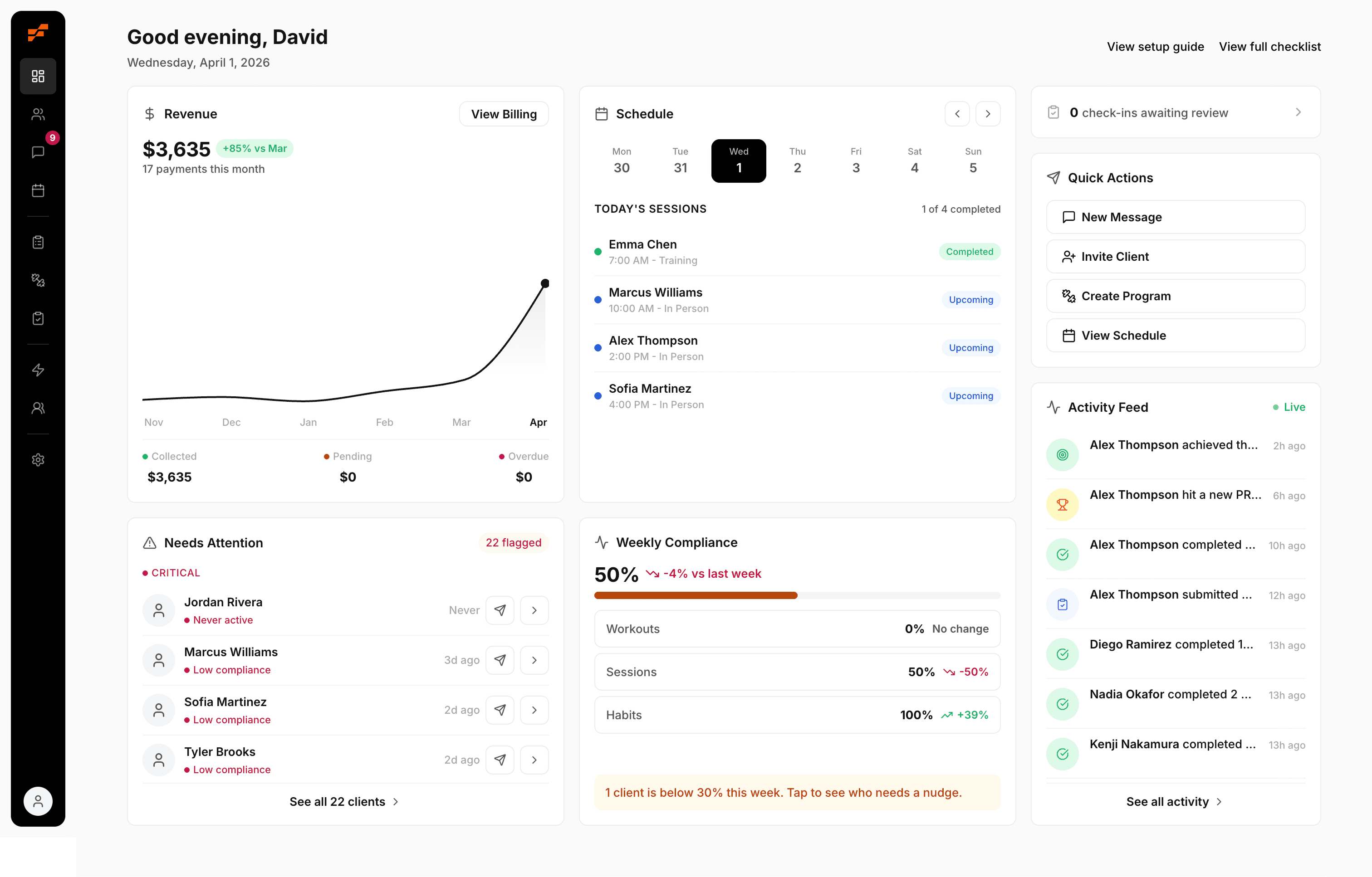
Choosing The Best Gym Schedule Software For Trainers

Sunday night hits, and instead of finishing your program updates or taking an actual break, you're doing admin triage. One client texts that they can only do 6 a.m. now. Another sends an Instagram DM asking if Thursday is still open. Someone else forgot how many sessions they have left. You check your calendar, then your notes app, then your spreadsheet, then your payment history, and you still don't fully trust what you're seeing.
That's the reason trainers start looking for gym schedule software. Not because they want a prettier calendar. Because the process is leaking time, creating avoidable mistakes, and putting you in the position of being part coach, part receptionist, part debt collector.
A lot of tools claim to solve this. Some just move the mess onto a screen. The good ones fix the workflow underneath it.
Table of Contents
The Sunday Night Scheduling Scramble
If you coach your own roster, you know this drill.
You're trying to lock in the week ahead. Half your clients are consistent. The other half are “mostly consistent,” which means you still need to confirm times, chase replies, and figure out who meant “same as usual.” One person wants to move from Tuesday to Wednesday. Another says they can train this week, but only if their meeting gets canceled. A third asks for a slot you already sort of promised to someone else.
The mess usually isn't one big problem
It's a pile of small failures:
Messages scattered everywhere: Text, email, DMs, missed calls.
Availability that lives in your head: You know your week, but the client doesn't.
Session counts tracked manually: So billing questions always show up at the wrong time.
No-show anxiety: You don't know whether that 7 a.m. is locked in or just “likely.”
Constant double-checking: Calendar says one thing, spreadsheet says another.
None of this feels dramatic in the moment. It just drains your attention.
You don't lose time from one big scheduling mistake. You lose it from fifty tiny interruptions that keep pulling you away from coaching.
For trainers with a small but active roster, this gets expensive fast. When you're managing 5 to 50 clients, even a modest amount of missed time or unpaid session confusion starts to squeeze your week, your energy, and your cash flow, as noted in Anolla's overview of gym software for automation and admin reduction.
What manual scheduling actually does to your week
The problem isn't only that it takes time. It also forces you to keep operational details in your head all day.
You're not just asking, “Who trains when?” You're asking:
Did they confirm?
Did they pay?
Do they still have sessions left?
If they cancel, who gets that slot?
Did I already remind them, or am I about to send a duplicate message?
That mental load is why so many trainers feel behind before the week even starts.
Gym schedule software matters when it stops that loop. Not when it gives you a shinier booking page. The win is getting out of the business of manually stitching together client communication, availability, and payments every single week.
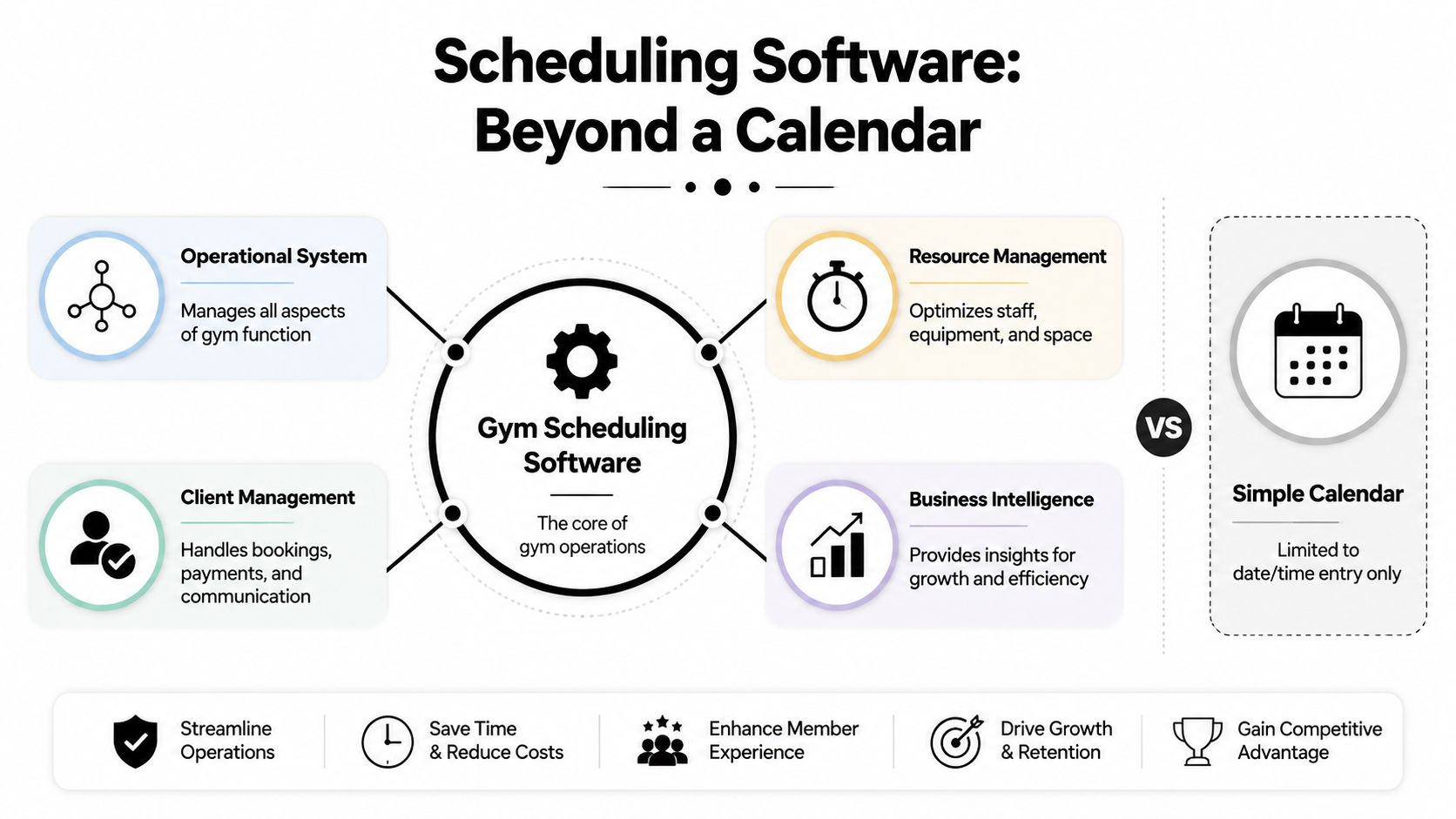
Scheduling Software Is an Operational System Not a Calendar
A trainer with 18 clients usually feels the break point fast. One client reschedules, another asks to swap times, a third is out of sessions but still books, and now one small calendar change has turned into messages, payment checks, and cleanup you did not plan for.
That is why gym schedule software needs to run the workflow behind the appointment, not just show the appointment.
A booking should trigger the rest of the system
A basic calendar records that someone took your 7 a.m. A working system handles the chain reaction that follows.
When a client books, the software should:
Reserve the slot immediately
Update your visible availability
Send the right confirmation
Apply your booking and cancellation rules
Connect the session to the client's package or payment status
Log the activity so you can review it later without piecing it together by hand
Smaller coaching businesses often feel the squeeze. If you manage 5 to 50 clients, you usually do not have front-desk coverage or an ops person catching mistakes. A weak setup pushes that job back onto you. Every manual handoff becomes a failure point. Double bookings, unpaid sessions, missed reminders, and lost follow-ups rarely come from one big system crash. They come from a dozen small gaps between tools.
What good software replaces
Software earns its place when a booking creates less work, not more.
Here is the shift:
Old workflow | Better workflow |
|---|---|
Client asks if you're free | Client sees live availability |
You manually confirm time | System confirms automatically |
You remind them later | Reminder sends on schedule |
You check if they paid | Booking ties to payment status |
You update notes in multiple places | Client activity stays connected |
That change matters more than the interface. Trainers usually do not lose hours to one giant admin block. They lose them in fragments. Two minutes checking payment before a session. Three minutes confirming a time that should have been auto-confirmed. Five minutes fixing a booking that slipped through after a cancellation.
I have seen this most with trainers who work across gym floor sessions, online calls, and house visits. Once your week spans multiple locations, a disconnected calendar stops being inconvenient and starts breaking operations. If that is your setup, this guide on managing personal training sessions across home, gym, and remote settings covers the scheduling pressure points well.
Practical rule: If a booking creates follow-up admin for you every time it happens, your software is still behaving like a calendar.
The shift that matters for working trainers
A lot of platforms now bundle scheduling with billing, client records, staff coordination, reporting, and marketing. That sounds useful, but for a solo trainer or small team, the key question is simpler. Does the system keep one client action from creating three more tasks for you?
Analysts at Technavio project continued growth in gym management software, with the market expected to grow by USD 210.00 million from 2025 to 2030 at an 11.8% CAGR, according to Technavio's gym management software market analysis. That growth makes sense. Trainers are not looking for more tabs. They are trying to remove the operational cracks that show up once a roster gets busy.
The useful test is simple. Check what happens after a client taps “book.” If the answer includes manual confirmation, payment checking, reminder sending, or separate record updates, the software is leaving the hardest part of scheduling on your shoulders.
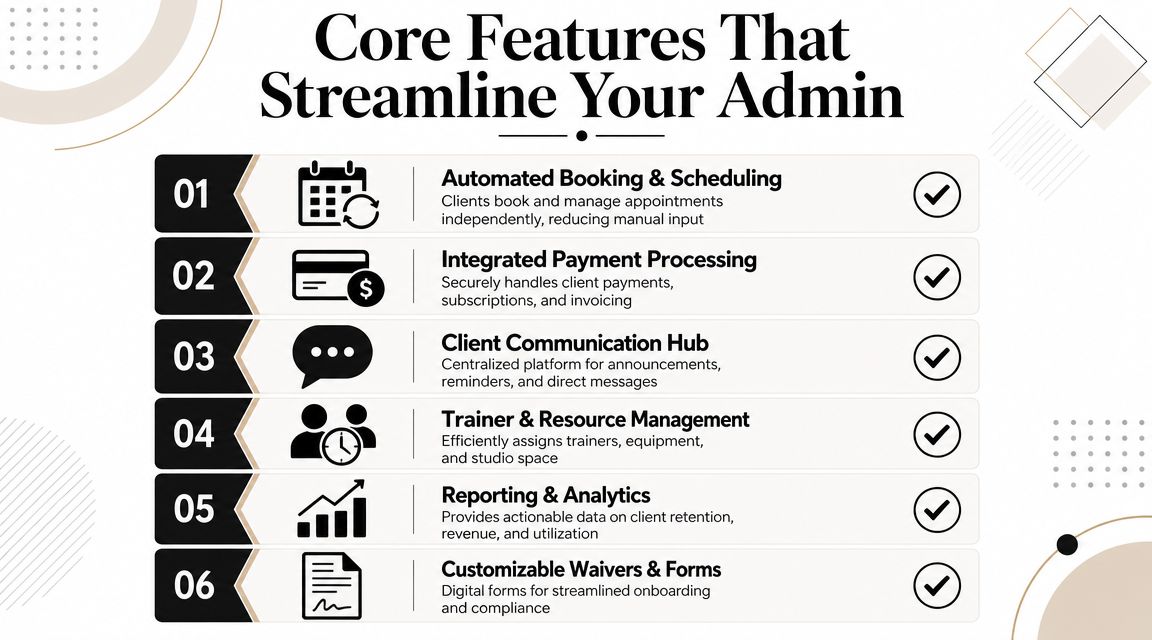
The Core Features That Actually Reduce Your Admin Work
Feature pages usually miss the point.
Trainers with 5 to 50 clients do not need more places to click. They need fewer moments where one client action creates cleanup later. The right software cuts off those failure points before they hit your phone, your payments, or your session notes.
Live availability that updates instantly
Real-time availability keeps small problems from turning into admin loops.
Glofox notes in its guide to gym management software features that live calendar updates, automated waitlists, reminders, and class size controls help gyms avoid manual follow-up. For a trainer, that shows up in very practical ways. A 7 a.m. slot gets booked and disappears right away. A cancellation opens the space right away. A waitlisted client gets the opening without you sending texts between sessions.
A calendar that only looks current causes the worst kind of friction. Clients think they booked. You think the slot is open. Then someone has to explain the mess.
Automated reminders that fit your workflow
Reminders only help if they reduce decisions.
A good setup sends a confirmation as soon as the booking is made, sends a reminder at the right interval for the session type, and gives the client a direct path to reschedule inside your rules. That last part matters. If the reminder still pushes them into your inbox, you still own the admin.
I have seen trainers blame no-shows on clients when the underlying issue was a weak reminder flow. The message went out, but the system gave the client no clean next step.
Self-serve booking and rescheduling with rules
Self-serve works when the boundaries are tight.
Clients should be able to book and move routine sessions on their own, but only within the limits you set. Those limits usually include booking windows, late reschedule cutoffs, waitlist behavior, and clear rules for whether a session pulls from a package, membership, or drop-in credit.
That is what keeps flexibility from turning into chaos.
If billing is still separate from scheduling, clean that up early. This guide on setting up recurring payments for training clients pairs well with that step.
Payment and package tracking tied to the booking
In this scenario, a lot of small training businesses lose time without noticing.
If a client can book before the system checks payment status, session credits, or package limits, someone has to verify it later. Usually that someone is you, at the worst possible time. Between sessions. Late at night. Sunday afternoon.
Here is what that looks like in practice:
Situation | What happens without integration |
|---|---|
Client books a session | You check manually whether they have paid |
Client asks about remaining sessions | You search invoices, notes, or old messages |
Client misses a session | You decide by hand whether it counts |
End of week review | You match bookings to payments line by line |
Software should handle those checks automatically. If it cannot, the booking flow is incomplete.
Reporting that shows the leaks
Useful reporting is operational, not decorative.
A trainer usually needs quick answers to a short list of questions:
Who booked
Who showed up
Who canceled late
Which time slots stay full
Which clients are fading out
What still needs attention on payments
That is enough to spot the leaks that hurt small rosters most. Late cancels stacking up on one day. A recurring client who has not booked in two weeks. Prime hours filled with low-value session types while better slots sit unused elsewhere.
Good reporting helps you catch those patterns early, while they are still easy to fix.
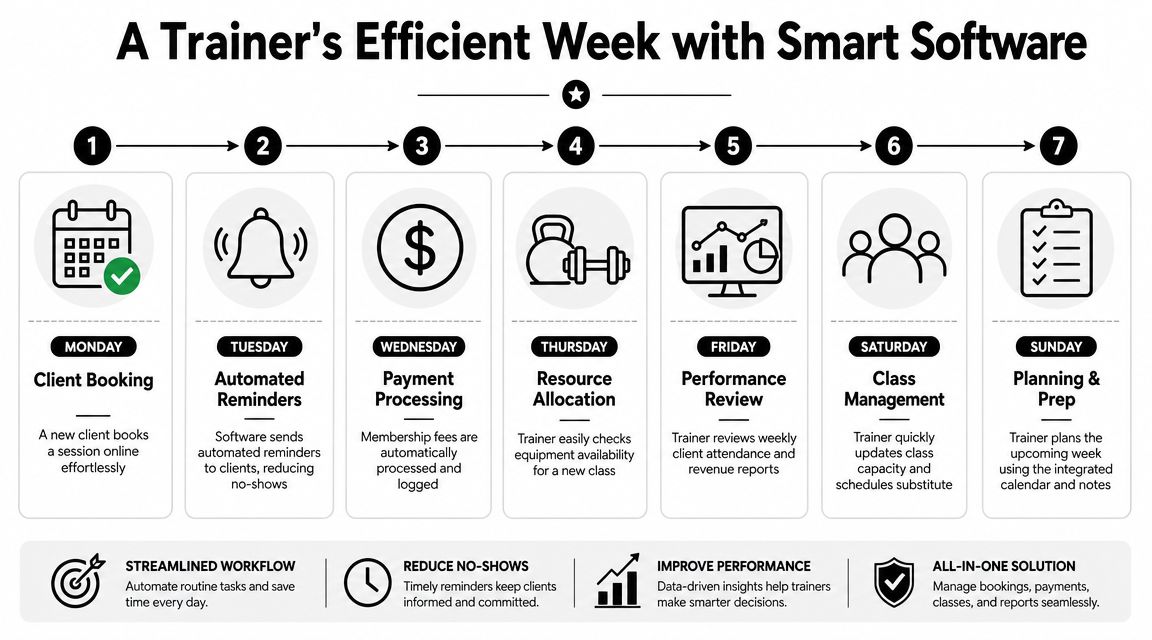
A Week in the Life With a System That Works
The easiest way to judge gym schedule software is to stop looking at the feature page and run through your actual week.
Here's what a normal week looks like when the system is doing its job.
Monday to Wednesday
On Monday, a client buys a package or joins a recurring membership. They don't need to message you to ask how to get started. They book from the available options you've already set.
You check your day and see the slot filled correctly. No duplicate notes. No separate payment reminder. No mental note to “sort that later.”
By Wednesday, upcoming sessions are already in motion. The software has sent confirmations and reminders based on the rules you set. You're not opening your phone between sets to answer simple logistics.
A lot of scheduling content misses the client side of this. The bigger attendance win comes from combining reminders with self-serve booking and recurring memberships, especially for trainers managing 5 to 50 clients, as discussed in EZnet Scheduler's CrossFit gym scheduling page.
Thursday when life happens
Thursday is where weak systems get exposed.
A client has a work conflict. In a bad setup, they text you late, ask what else is open, and wait for you to answer. In a better setup, they reschedule inside the system according to your rules. Their original slot opens back up correctly. If you run a waitlist, the opening can be filled without extra admin.
That's not about convenience. It's about keeping your day intact.
If you're comparing tools that support that kind of week cleanly, this roundup of the best personal trainer app options for coaching businesses gives useful context.
Here's a quick visual example of what that weekly flow should feel like in practice:
A working system should make routine client behavior boring. Booking, reminders, reschedules, and payments should happen without needing your attention.
Friday to Sunday
Friday is where you usually feel whether the week was clean or messy.
With the right setup, you can review attendance, see what got booked, note who canceled, and move on. You're not reconstructing the week from message threads.
By Sunday, planning ahead looks different too. You're reviewing real availability and real commitments, not chasing uncertain replies.
That changes the feel of the business. You still coach. You still manage clients. But you stop acting like the manual connection point between every booking, reminder, and payment.
How to Choose Your Software and Avoid Common Red Flags
Software shopping usually starts after a bad week.
A client says they booked but never got a confirmation. Another cancels, but the slot stays blocked. A package count is off, so now you are checking payments against past sessions instead of programming workouts. That is the point where a lot of trainers switch. The actual problem is not inconvenience. It is operational drag that keeps showing up in the same places.
The next mistake is buying based on the demo instead of the day-to-day workload. A polished sales call can hide weak booking logic, messy payment rules, and support that disappears once you are live. For coaches managing 5 to 50 clients, those gaps show up fast.
Green flags that matter in the real world
As noted earlier, more software options in this market means more noise. Plenty of platforms look capable until you test the exact workflows that tend to break a trainer's week.
So judge the product by what happens in routine use.
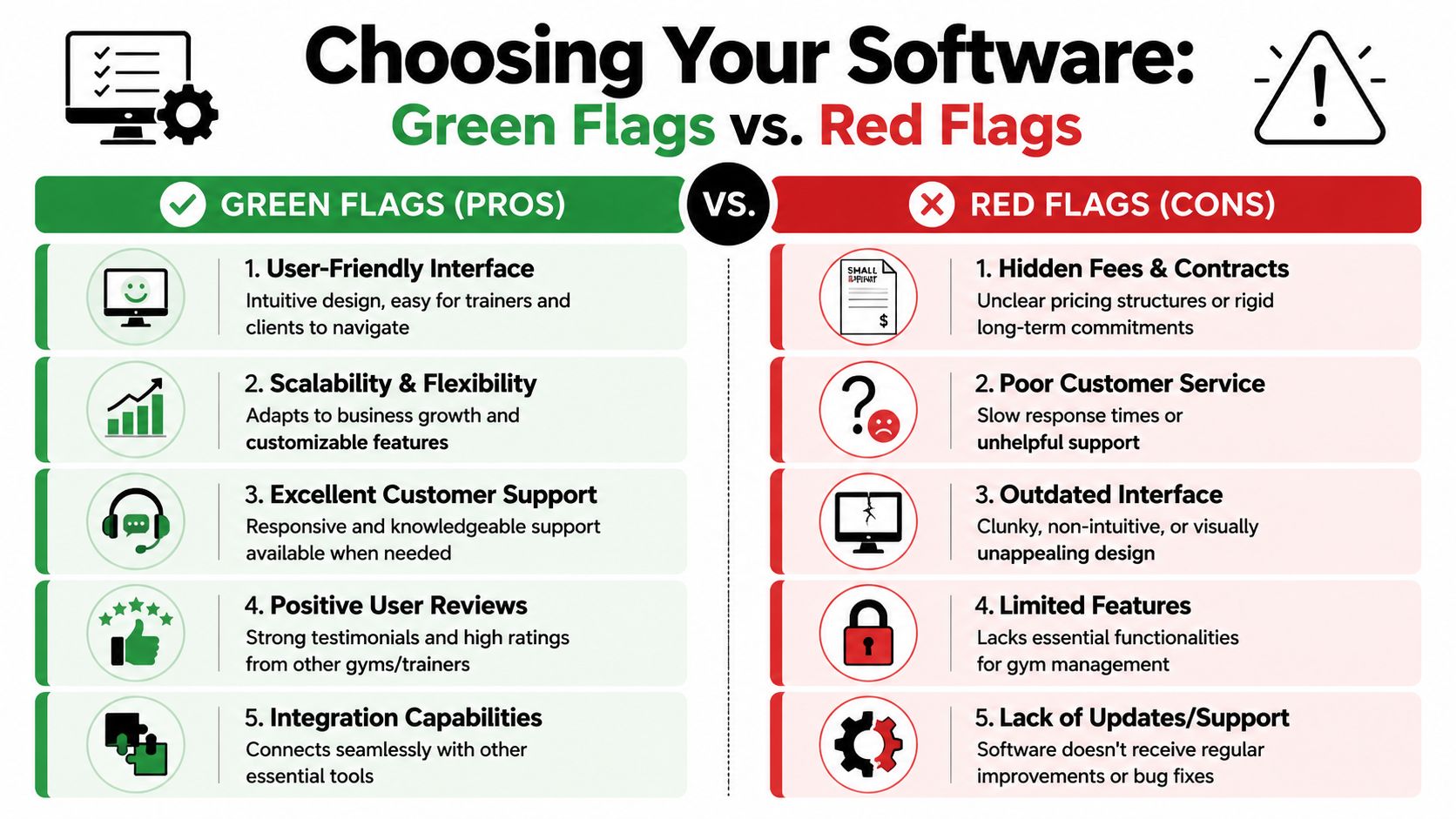
Green flags
Clear pricing: You should know what you will pay, what is included, and what costs extra before you commit.
Booking that is obvious on the first try: If a client has to guess where to click, bookings will drop and questions will land in your inbox.
Support from people who understand coaching operations: You need real answers when a recurring session breaks or a payment fails.
Product focus: The software should handle scheduling, payments, attendance, and client records cleanly. Extra tools mean very little if the basics are shaky.
Consistent maintenance: Bugs get fixed, small improvements keep shipping, and the product does not feel abandoned.
A simple test works well here. Can a new client book, pay, receive reminders, and show up correctly on your calendar without you touching anything? If not, the system is still depending on your manual cleanup.
Red flags most trainers learn the hard way
These problems rarely show up as one dramatic failure. They show up as ten small interruptions every week.
Pricing that drifts upward
The monthly rate looks fine at signup. Then online booking sits in one tier, automations sit in another, and useful reporting becomes an add-on. You end up paying more to restore the workflow you thought you bought in the first place.
Buggy basics
This one matters most. If sessions fail to sync, reminders go out at the wrong time, or canceled appointments do not reopen correctly, the software creates admin work instead of removing it. Trainers feel that immediately because they are the ones cleaning up the confusion.
Feedback goes nowhere
Good support is not just fast replies. It is a sign that the company understands the consequences of a broken workflow. If you report a real issue and get canned responses or silence, expect the same pattern when something bigger goes wrong.
Post-acquisition drift
Experienced coaches spot this early. The platform starts serving broader audiences, the roadmap shifts, and the small details trainers depend on get less attention. Booking takes more clicks. Support gets slower. The product grows outward while the core workflow gets weaker.
Coaches who also handle meal planning usually run into the same buying problems. The checklist is similar when comparing a nutrition coaching app for managing clients and programs.
Watch the demo closely: If the salesperson spends more time showing dashboards and add-ons than the path from booking to payment to attendance tracking, the core system probably needs too much babysitting.
Questions worth asking before you commit
Use the demo to pressure-test the failure points that cost the most time later:
What happens immediately after a client books?
Can clients reschedule by themselves within my rules?
How do payments connect to bookings, packages, and no-shows?
What do I see if a reminder fails or a session does not sync correctly?
Who answers support questions, and how fast do they handle workflow issues from trainers?
Ask them to show the workflow, not describe it.
That is the difference between software that helps you run a business and software that gives you another system to supervise.
Why FitCentral Was Built by a Trainer for Trainers
By the time a trainer starts shopping for new software, the problem usually is not “I need more features.” It is “I am tired of babysitting basic operations.”
That is the context behind FitCentral.

Built from the coaching workflow outward
FitCentral was co-founded by David Spitdowski, a practicing personal trainer who still works with clients. That matters for a simple reason. Trainers with 5 clients feel friction. Trainers with 25 or 50 feel failure points.
A missed session log turns into billing cleanup. A reschedule request turns into three messages. A no-show without a payment rule turns into an awkward follow-up and lost revenue. Those are not edge cases. They are weekly operational problems, and software either reduces them or adds to them.
You can read more about the team and background on the FitCentral company page.
Why that origin changes the product
FitCentral's approach reflects how a real coaching business runs. Booking, payments, session tracking, client notes, and communication need to connect cleanly so one action does not create five manual follow-ups later.
That is the difference trainers feel first. Not in a feature comparison table, but on a normal Tuesday when the schedule shifts, two clients reschedule, one payment fails, and nobody has time to chase disconnected systems.
FitCentral also keeps the pricing straightforward at $29 per month plus $1 per active client, with no hidden tiers. For independent trainers and small coaching teams, that matters because software costs rarely stay theoretical. Price creep shows up fast when client count changes month to month.
Good trainer software should match the way coaches already work, then remove the repeat admin that drains time and attention.
The strongest products usually come from people who know where the workflow breaks in real life. When the person shaping the tool still coaches, the small operational details tend to get handled before they become daily annoyances.
Your 24-Hour Scheduling Audit
If you want to know whether your current setup is costing you too much, don't start with a demo. Start with your own week.
Run this audit in the next 24 hours.
Step 1
Track every scheduling touch for one day.
Count every text, email, DM, calendar edit, reminder, payment follow-up, and “quick check” related to booking or attendance. Don't estimate. Write it down as it happens.
Step 2
Review your last month for leaks.
Look for unpaid no-shows, late cancellations that created dead time, sessions you forgot to bill, and times you manually moved clients around to fix a schedule problem. You don't need fancy reporting to spot patterns. You just need honesty.
Step 3
Ask one reliable client for blunt feedback.
Send a short message: “Be honest, is my booking and rescheduling process easy, or is it more annoying than it should be?” Good clients will tell you the truth if you ask directly.
Here's what you're looking for:
Repeated admin touches: Same client, same issue, every week
Unclear payment status: You have to check more than one place
Booking friction: Clients need you to complete basic actions
Mental load: You're carrying the schedule in your head
If two or three of those show up, you don't have a calendar problem. You have a system problem.
If your audit shows that scheduling is still living in your inbox, your notes app, and your head, take a serious look at FitCentral. It was built for coaches who want one reliable place for scheduling, payments, messaging, programming, and client management, without the usual price creep, clunky workflows, or feedback black hole that pushed them to switch in the first place.
See also




Ready to stop fighting your software?
FitCentral gives you everything you need to manage clients, deliver results, and grow your business. Sign up today.