The client app
The app your clients actually open.
Free on iOS and Android for everyone you invite. Built so a client can log a set between rounds without thinking about it, and so you see the result before they have left the floor.

01 · Training
You see the session, not a summary.
Every set, weight and rep lands on your side as it happens, because the client never has to fight the app to record it. Sweaty thumb, bad gym wifi, no signal in the basement. It still logs.
It saves as they go. Every field commits on its own, so a dropped call or a locked screen never costs a set.
It works with no signal. Basements, car parks, and dead zones. The session logs offline and syncs when the phone finds a connection.
Last time is right there. Previous weights and reps sit under each exercise, so nobody has to remember or scroll to find them.
Give clients a better logger

The workout logger

Your demos, not stock clips
Attach your own demo video and coaching cue to any exercise. The client sees your version at the moment the set is performed.

Your prescription arrives intact
Sets, reps, RPE, tempo and rest reach the client exactly as you wrote them, with nothing flattened out on the way.

The check-in starts from facts
You open the conversation already knowing what happened, instead of asking a client to remember a session from four days ago.
02 · Booking and messaging
They book, you stop counting sessions.
They book their own sessions. Open slots and session packs, so the scheduling back-and-forth stops being your job.
The balance is theirs to see. Sessions used and sessions left, visible in the app, which retires the question you answer more than any other.
One thread, with context. A question about last night’s session arrives attached to last night’s session, not to a screenshot on a different app.
See scheduling

Messaging and booking
03 · Nutrition
What they ate, next to what they lifted.
Run nutrition through a second app and you cannot see into it, cannot set the targets, and cannot tell whether the week actually worked. Here the food log sits beside the training log, on numbers you set.
Scan the barcode. Point the camera at the packet, or type the number if the light is bad. Both work.
Your plan, their day. Targets you set appear against what they actually ate, so nobody is guessing whether the day worked.
Recipes and meal plans included. Not a paid module, not a partner upsell. It is in the same one price.
Included at one price

The nutrition screen

Three ways to log a food
Scan it, type the barcode number, or search the database. Whichever is fastest in the moment the client is standing in the kitchen.

Meal plans they can follow
Build the plan on your side and it arrives as something a client can actually cook from, with the macros already attached.
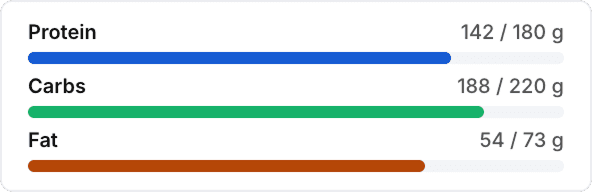
Targets you control
Set macro and calorie targets per client and change them as the block changes. The client sees the number that matters today.
04 · Habits, progress and check-ins
Nobody quits during a session. They quit in the ten days after one, when nothing is asking anything of them. Habits and streaks give a client a reason to open the app on a day they are not training.
Check-ins without the chasing. Clients complete their check-in form in the app, so the weekly round of reminder texts stops being part of your job.
Progress they can see. Weight, measurements, photos and strength history build a record that makes the slow months visible.
Watch data flows in. Steps, sleep, resting heart rate and watch workouts arrive through Apple Health and Health Connect.
See how retention works

Habits and progress
Everything in the app
Things your clients can do in the app.
Training
11
Assigned workouts and blocks
Offline logging
Auto-save on every set
Last time’s weight and reps
Demo video on any exercise
Coach notes per exercise
Rest timer
Supersets and circuits
RPE, tempo and rest targets
Personal record detection
Full workout history
Nutrition
8
Daily food log
Barcode camera scan
Typed barcode entry
Food database search
Calorie target
Protein, carb and fat targets
Assigned meal plans
Recipes with macros attached
Progress and wearables
10
Body weight tracking
Body measurements
Progress photos
Strength history
Personal record log
Apple Health sync
Health Connect sync
Steps and sleep
Resting heart rate
Watch workouts
Habits and check-ins
5
Daily habit list
One-tap completion
Streaks
Milestone celebrations
Check-in forms
Messaging
6
Direct thread with your coach
Photo and video attachments
Read receipts
Message search
Reactions
Replies to a specific message
Booking
6
Upcoming sessions
Book your own sessions
Session pack balance
Session history
Cancel and reschedule
Calendar view
All of it included. Your clients pay nothing.
Questions
What coaches ask about the client app.
Will my clients actually use it?
+
The app is built to remove every reason not to. It is free, it opens straight to today’s workout, every exercise shows what they lifted last time so they know the number to beat, and streaks, habit rings, and progress charts give them a reason to open it on rest days. Reminders land on their lock screen, so the nudge does not always have to come from you.
Do my clients have to pay for it?
+
No, and they never see a price. It is free on the App Store and Google Play with no in-app purchases and no upsells. The $1 per active client sits on your invoice, not theirs.
Can I put my own branding on it?
+
Yes. Your logo, your business name, and your brand color run through the app your clients use and through the emails they receive from you, and the FitCentral mark disappears from their view once you are on a paid plan. The app they download from the store is still called FitCentral. A fully branded app icon under your own name is available as a Lifetime add-on.
Does it work in a gym with no signal?
+
For logging, yes. If the signal drops mid session, in a basement gym or a dead spot in the building, your client keeps logging their sets as normal and everything uploads by itself the moment they reconnect. Loading something they have not opened yet, like a brand new message, still needs a connection.
Do they get reminded, or am I still chasing them?
+
They get reminded. A notification hits their lock screen for your messages, a new check-in form, the day they have a workout scheduled, their own habit reminders, an hour before a booked session, and when a streak is about to break. They control every one of those from their settings, and it all still shows up inside the app either way.
Does it connect to their watch?
+
It reads Apple Health on iPhone and Health Connect on Android, pulling in steps, calories burned, workouts, heart rate, sleep, and body weight. That covers most major wearables, including Apple Watch, Garmin, Oura, Whoop, and Samsung, once your client turns sharing on inside that device’s own app. Apple Watch is the one that just works.

The coaching platform built side by side
with a practicing coach. Program,
schedule, bill, and keep clients longer.
© 2026 FitCentral LLC. All rights reserved.
Made in Atlanta, GA